

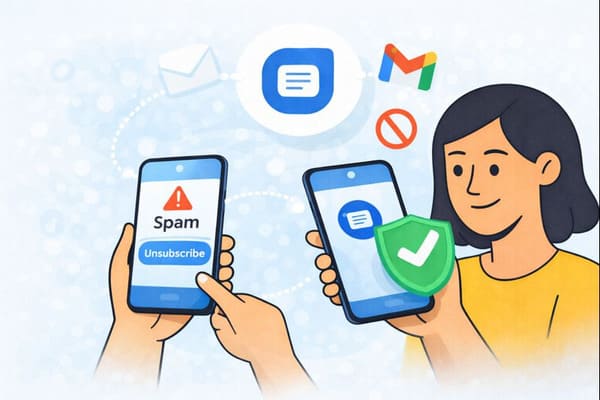
Want to stop receiving unwanted promotional messages on your phone? Google Messages’ unsubscribe feature offers a simple and effective way to reduce spam and regain control over your conversations—without blocking senders or digging through settings.
If your message inbox is constantly interrupted by marketing alerts, delivery promos, or subscription reminders you no longer need, you’re not alone. Many Android users deal with the same frustration: important messages get buried under a stream of non-essential notifications.
Google Messages makes this easier by letting you unsubscribe directly from promotional SMS, MMS, and RCS business messages with just a tap. Instead of manually replying “STOP” or blocking numbers one by one, the app handles the opt-out process for you—while still allowing essential messages like one-time passwords or boarding passes to come through when needed.
In this guide, we’ll explain how the unsubscribe feature works, where it’s available, and why using it can significantly improve your messaging experience.
And if you want to keep your inbox clean automatically, you can use Cleanfox for free to reduce unwanted emails and spam.
Understanding the Unsubscribe Feature in Google Messages
Activation and Availability
To activate the unsubscribe feature in Google Messages on your Android device, open the app and go to the conversation with the unwanted sender.
Look for the unsubscribe button at the bottom of the thread, just above the text input.
It may also appear in the overflow menu, accessible via the three-dot icon in the upper-right corner.
This tool is being widely rolled out. It is available for RCS business messages in countries such as the United States, Brazil, France, Germany, India, Mexico, Spain, and the United Kingdom.

Additionally, it supports SMS and MMS messages from short codes or alphanumeric senders in the United States.
Technical Mechanics
When you tap “unsubscribe,” Google Messages will prompt you to select a reason for opting out, such as “not signed up,” “too many messages,” “no longer interested,” “spam,” or “other.” If you choose “spam,” you can also report the sender to help address broader spam-related issues.
Behind the scenes, the app sends a protocol-level STOP command from your number to the business via the same channel (SMS, MMS, or RCS). This triggers their opt-out logic, ensuring that promotional or marketing messages stop. However, you will still receive essential communications like one-time passwords, boarding passes, or unsubscribe confirmations.
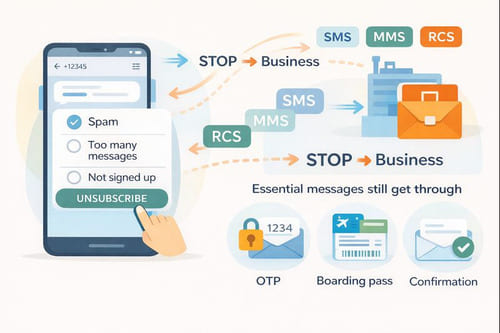
Businesses typically reply with an automated apology and instructions to send “START” if you wish to resubscribe. This feature is persistent across devices as long as the same phone number is used, since it is tied to the business’s systems rather than your specific phone.
User Experience
The experience feels seamless. A confirmation pops up directly in the chat, along with a “Subscribe again” link if you decide to opt back in. This helps keep your inbox clutter-free, supporting healthy email routines without any additional hassle.
In cases where a sender cannot process the unsubscribe request due to your account settings, they may prompt you to adjust your notification preferences. Overall, this feature is a significant upgrade for users who are tired of spam cluttering their Google Messages.
Benefits of Using the Unsubscribe Feature

Say goodbye to spam, clutter, and chaos.
Our smart email cleaner filters out junk, organizes your inbox, and helps you focus on what really matters.
✅ Block spam automatically
✅ Organize emails by priority
✅ Keep your inbox clean
✅ Clean old emails you don’t read
📱 Available on the App Store and Google Play.


Reduced Inbox Clutter
Imagine reclaiming and keeping your Google Messages inbox clean and organized from endless marketing promotions and automated blasts. By tapping unsubscribe, you can instantly filter out non-essential noise, leaving space for what truly matters in your daily chats.
This keeps your app focused and responsive, transforming a chaotic feed into a streamlined hub—without manual blocking or endless scrolling.
Improved Privacy and Security
When you signal senders directly with your unsubscribe request, you empower carriers and platforms to respect your boundaries. This reduces exposure to shady spam that might hide phishing links or data grabs. Additionally, the privacy policy of compliant businesses ensures your opt-out remains effective across devices.
Taking this proactive step bolsters your Android messaging security, as fewer unknown contacts mean less risk of unwanted tracking or scams slipping through.
Encouragement of Better Practices by Marketers
Here’s the ripple effect: when business senders receive clear feedback via your selected reason—like “too many messages” or “spam”—they refine their RCS business message strategies. This leads to improved list hygiene and boosts overall deliverability for everyone.
Such feedback nudges the industry toward ethical norms, where legitimate news and offers respect opt-outs. Over time, this fosters trust and potentially reduces aggressive marketing tactics.
Practical Scenarios Where the Unsubscribe Feature Shines
Everyday Annoyances
You’ve probably received that one repeat promotional message from a retailer or service that shows up at the busiest moment. By tapping the Unsubscribe button in Google Messages, you can remove those recurring marketing or spammy notifications with a single action. This feature stops non-essential SMS, MMS, or RCS business messages, ensuring your conversations stay focused on people, not promotions.
Since the app automatically surfaces the option for threads it detects as business or promotional, you don’t need to hunt through settings to opt out. The option appears right where the message lands, saving you time and frustration when all you want is to stop the noise.
Managing Multiple Subscriptions
If you’re juggling alerts from stores, delivery services, news outlets, and loyalty programs, Google Messages’ unsubscribe flow simplifies the process. Each tap sends a protocol-level STOP command to the sender. This lets you manage multiple subscriptions without texting each sender manually.
Enhancing Focus and Productivity
Digital minimalism for your inbox reduces interruptions from promotional blasts and has a direct impact on concentration. With fewer unnecessary pings, you can prioritize notifications for essential messages—like one-time passwords or confirmations—while muting marketing traffic that distracts you and fragments your attention.
For professionals who rely on Google Messages for time-sensitive communication, the unsubscribe feature keeps messages relevant. It saves time by reducing junk messages and unnecessary notifications.
Conclusion
Dear reader, the Google Messages unsubscribe feature allows you to quickly stop receiving unwanted SMS, MMS, or RCS business messages with just a tap. By sending a “STOP” command, it ensures you can still receive essential messages like one-time passwords. This feature is currently available in the United States, Brazil, France, Germany, India, Mexico, Spain, and the United Kingdom.
It helps to declutter your inbox, enhance your privacy, and supports ethical marketing practices. Don’t let spam distract you anymore! Open Google Messages, find the unsubscribe button in promotional chats, select your reason, and take back control. A cleaner and safer messaging experience is just a step away—act now for instant relief!
FAQ
How exactly does Google Messages’ Unsubscribe button stop promotional or spam messages for me?
When you tap Unsubscribe in Google Messages, the app sends a protocol-level “STOP” command from your number to the sender. This sender could be an SMS short code, an alphanumeric sender, or an RCS business channel. The command triggers the sender’s opt-out logic, stopping non-essential or promotional messages. However, essential messages like OTPs, boarding passes, or confirmations may still be allowed. If needed, you can resubscribe later. Additionally, selecting “Spam” can report the sender to Google for review.
Which message types and senders (SMS, MMS, RCS, short codes, businesses) are covered by the Unsubscribe feature and in which countries does it work?
The Unsubscribe feature in Google Messages covers RCS Business chats in the US, Brazil, France, Germany, India, Mexico, Spain, and the UK. It also applies to SMS/MMS messages from short codes and alphanumeric senders in the US. When you unsubscribe, a protocol STOP command is sent to the originating sender to activate their opt-out process.
What happens behind the scenes when I tap Unsubscribe (what is sent to the sender, can essential messages still arrive, and can I resubscribe)?
When you tap Unsubscribe, Google Messages sends a protocol-level “STOP” command from your phone number to the sender over SMS, MMS, or RCS. This triggers the sender’s opt-out logic and removes your number from their promotional messaging list. Essential transactional messages, if handled separately from marketing communications, may still be delivered. In most cases, you can resubscribe later by replying with “START” or using the sender’s subscription preferences.
Could using the Unsubscribe button affect my relationship with a business (deliverability, account settings, or reporting the sender as spam)?
Using the Unsubscribe button in Google Messages simply removes your number from the sender’s promotional messaging list. It does not affect your account or access to essential communications. If you choose “Spam,” the sender may also be reported to Google for review, which helps reduce abusive messaging practices across the ecosystem.