

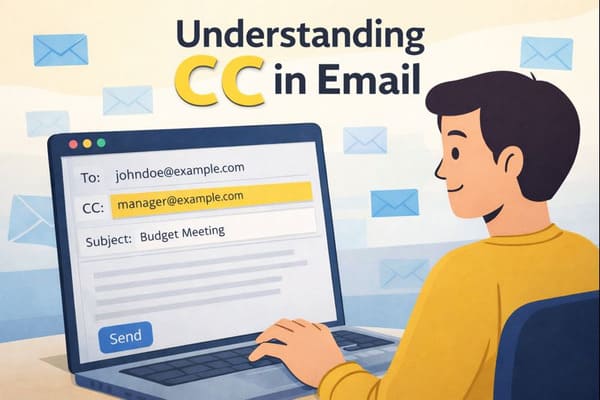
CC in Email: What It Means and How to Use It Properly
Email communication relies heavily on clarity and transparency—especially in professional settings. One of the most commonly used (and sometimes misunderstood) features is CC. Knowing exactly what CC means, how it works, and when to use it helps you keep the right people informed without creating confusion or inbox overload.
In this guide, you’ll learn what CC in email stands for, how it differs from BCC, and how to use it effectively in real-world scenarios using email clients such as Gmail.
And if you want to make sure your inbox stays 100% clean and free from spam, you can use our Cleanfox platform for free.
What Does CC Mean in Email?
CC in email stands for carbon copy, a feature that allows you to send a copy of your email to additional recipients beyond the primary ones listed in the “To” field. By adding someone to the CC field in your email client, such as Gmail, they will receive the entire message. Additionally, their email address will be visible to all other recipients, including those in the “To” and “CC” fields. This makes it an ideal option for transparently keeping relevant individuals informed.
Understanding CC in Email Communication
How CC Works
When you’re composing an email in your favorite email client, like Gmail, you’ll notice the CC field located just below the “To” field. Simply type in the email addresses of the secondary recipients you want to include, and hit send. Your email service will then deliver the full message to everyone. The email addresses entered in the CC field will be fully displayed in the email header for all recipients to see. This ensures that the message reaches them in the same way it does the primary recipient.
Step. 1👇
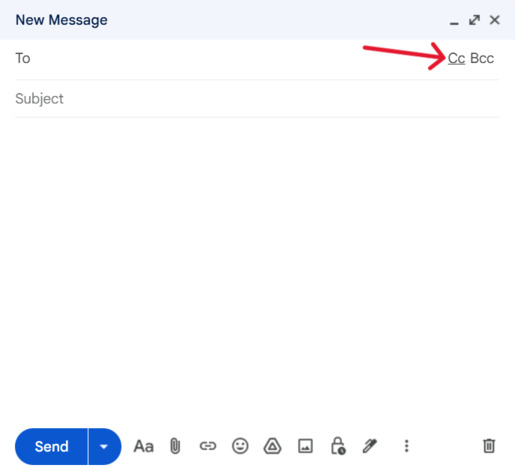
Step. 2👇
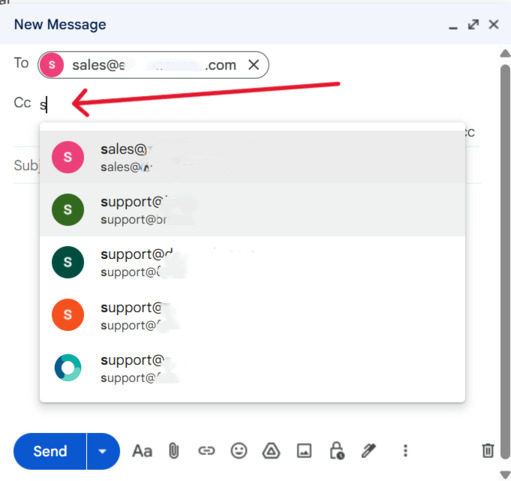
Common Uses of CC
In your daily workflow, the CC field can be used as a courtesy copy to keep team members or supervisors informed about project updates without expecting a reply. It’s also useful for sharing client feedback to build transparency and trust among recipients. For instance, you might copy your boss on a vendor negotiation email to help them effortlessly track progress. It’s a practical tool for ensuring that everyone who needs to stay informed remains in the loop.
Visibility and Transparency
Unlike the BCC field, where email addresses are hidden for privacy, the CC field ensures that every recipient’s email address is visible to all others listed in the To and CC fields. Recipients in BCC remain hidden from other recipients (including from each other), and only the sender can see everyone who was included. This promotes open communication and is ideal when you don’t mind others knowing who is included on the email’s recipient list.
When to Use CC in Professional Emails

Say goodbye to spam, clutter, and chaos.
Our smart email cleaner filters out junk, organizes your inbox, and helps you focus on what really matters.
✅ Block spam automatically
✅ Organize emails by priority
✅ Keep your inbox clean
✅ Clean old emails you don’t read
📱 Available on the App Store and Google Play.


Coordinating with Teams
Use the CC field when coordinating with teams on shared tasks, such as updating everyone on a marketing campaign milestone. This ensures that all members stay aligned without requiring direct action from those copied. It helps maintain a smooth flow of communication across departments and avoids the clutter of separate forwards.
Updating Supervisors or Stakeholders
Add your supervisors or stakeholders to the CC field for routine project updates. This keeps them informed about key decisions or progress without involving them in the reply chain unnecessarily. It’s an effective way to ensure transparency in stakeholder communications, such as notifying executives about the outcomes of client meetings.
Ensuring Compliance and Accountability
Leverage CC to document compliance by including legal or HR representatives in policy-related emails. This creates a visible trail that fosters accountability among all recipients. Such a practice is especially useful for referencing who has been informed, thereby reducing confusion in regulated environments.
Practical Examples of When and How to Use CC in Emails
Example 1: Project Updates
Imagine you’re the marketing lead sending a Q4 budget proposal. Place the finance director in “To” for approval, and CC your manager and the CFO to keep them informed of the numbers without requiring immediate responses. Use a subject line like “Q4 Marketing Budget Approval Needed by Friday” to ensure everyone can quickly scan the key points, making it easy to respect their busy schedules.
Example 2: Client Communications
When ordering supplies for your retail outlet, address the supplier in “To,” and CC your fellow manager and the corporate controller. This ensures they are aware of the incoming receipt paper and its accounting in the books. By openly sharing the purchase order details, you help maintain smooth operations and transparency among all parties involved.
Example 3: Administrative Announcements
If you’re a purchasing manager announcing a new delivery policy starting at 7 a.m., you might typically use BCC for vendor privacy. However, when updating internal admins, CC your ops team in a follow-up email. This ensures store-wide accountability while keeping external addresses private.
Conclusion
Dear reader, always keep in mind: CC stands for carbon copy, allowing for transparent inclusion of secondary recipients in the visible field. It’s perfect for enhancing team coordination, keeping supervisors informed, and ensuring accountability—without necessarily expecting replies. Use it judiciously to avoid unnecessary inbox clutter, combine it wisely with the “To” field for actionable tasks, and choose BCC when maintaining privacy is essential.
Mastering this feature in your email client, such as Gmail, can significantly improve your professional communication. Start today by carefully reviewing the recipients of your next email draft.
By practicing these tips, you’ll see your emails effortlessly foster clarity and respect in every interaction.
FAQ
What is the difference between CC and BCC in emails?
CC (Carbon Copy) displays all recipient addresses to everyone in the To and CC fields. This promotes transparency and allows replies to reach all parties. BCC (Blind Carbon Copy), on the other hand, hides recipient addresses from others, maintaining privacy and preventing BCC recipients from being visible to other recipients (including other BCC recipients). Use CC for transparency, and BCC for mass emails or confidentiality.
When should you use CC in a professional email?
Use CC in professional emails to keep team members, managers, or stakeholders informed without requiring action. It demonstrates transparency or urgency, such as CCing your boss on vendor delays. It is also useful for updating on projects or sharing information after meetings. Remember, visibility is key—everyone can see the recipients in the To and CC fields.
What are common mistakes to avoid when using CC?
Common mistakes to avoid when using CC include adding too many recipients unnecessarily, failing to explain why someone is CCed, or using CC when confidentiality is required. Overusing CC can lead to confusion or overwhelm recipients with unnecessary emails. Always consider whether CC is truly needed before using it. For more guidance on writing clear and effective messages, check out our bad email examples and how to fix them.
How can you explain why you’re CCing someone in an email?
CC means “carbon copy” in emails, and it sends a copy to someone beyond the primary “To” recipient. This keeps them informed without expecting a reply. Use CC for stakeholders, introductions, or maintaining transparency. Be clear about why you’re including someone in the CC list, as all recipients can see who is CCed.
